

Tracer/sweep does not modify workloads or infrastructure. It only reads execution metadata and cloud billing information to provide findings.
What Tracer/sweep does
Tracer/sweep performs a read-only scan of your compute environment and:- Map it to pipeline and execution activity from Tracer/collect (if setup)
- Evaluates CPU, memory, process, I/O, and container-level behavior
- Detects periods where machines are running without active work
- Identifies resources that appear active but have no meaningful execution
- Prioritizes findings by estimated impact
Idle Instance Scanning
Overview
Idle Instance Scanning identifies EC2 instances that remain online without running active processes or tasks. This helps teams locate compute resources that can be shut down, consolidated, or resized.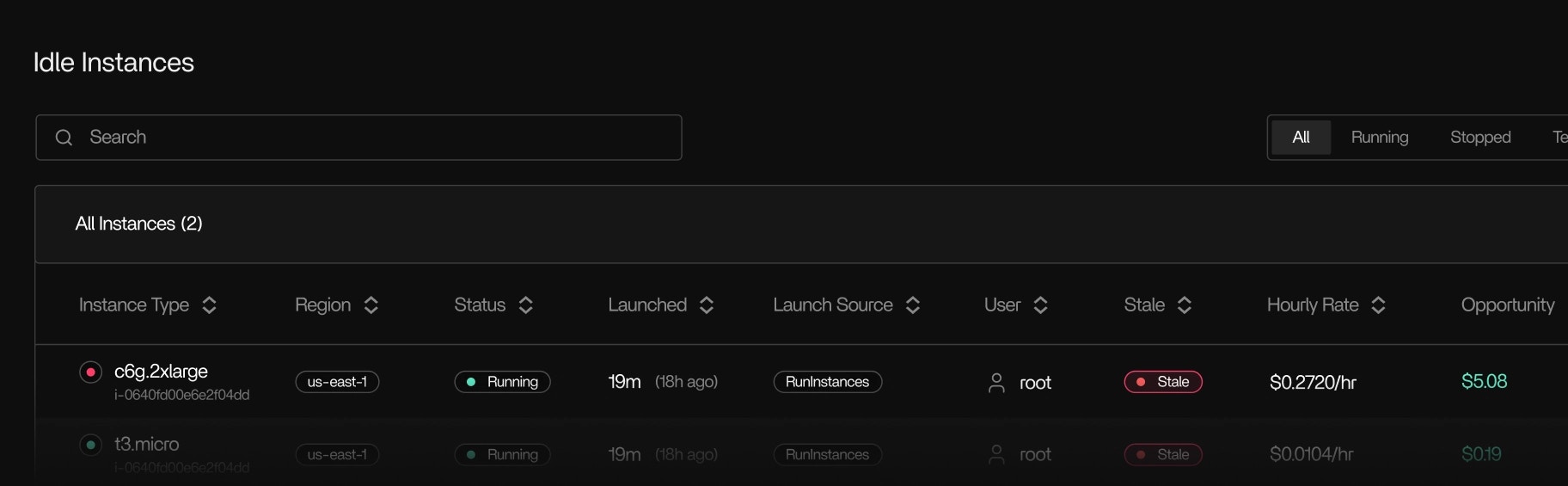
How it works
Tracer/sweep relies on execution signals collected from each instance. These include:- CPU scheduling activity
- Memory activity and pressure
- Process start and stop events
- Disk and network I/O
- Container and namespace activity
- GPU job activity when present
- Instances with no running processes
- Machines that remain idle after a workflow or task completes
- Instances where tasks have exited or stalled but the machine continues running
- GPU nodes with no scheduled workloads
- Instances with periodic spikes but no sustained execution
- The detection timestamp
- The reason for classification
- The duration of the idle period (when available)
What Tracer/sweep finds
Tracer/sweep highlights several categories of unused or inefficient compute, including:Idle instances
Idle instances
Instances running without active processes or useful work.
Underutilized instances
Underutilized instances
Machines that appear busy in high-level metrics but show little or no execution activity inside the OS.
Orphaned or forgotten resources
Orphaned or forgotten resources
Instances left running after workflow changes, testing, or deployments.
Inactive GPU nodes
Inactive GPU nodes
GPU servers without active kernels or workloads.
All findings are based on observed execution behavior, not estimates or predictive heuristics.
Outputs
Tracer/sweep provides:- A ranked list of potential cost-saving opportunities
- The detection reason for each idle or underutilized instance
- Estimated impact ranges based on observed activity
- Suggested next steps such as resizing or shutting down instances
What Tracer/sweep does not do
Tracer/sweep is read-only. It does not:Requirements
Tracer/sweep requires:- Tracer/collect installed on instances to provide execution signals
- A read-only IAM role to access cloud cost and usage data (AWS supported)
- Access to the Tracer UI
Installation
Follow these steps to connect your AWS account.Before you begin
Ensure you have:- An AWS account with permission to create IAM roles
- Access to the Tracer UI
Create a read-only IAM role
In the Tracer UI, open the provided CloudFormation link.
- Deploy the CloudFormation stack.
- The External ID is pre-filled.
Provide the Role ARN
After deployment, locate the
TracerReadRoleArn output.- Copy the Role ARN.
- Paste it into the Tracer UI and save.
Security model
- The IAM role is read-only
- No application data or secrets are accessed
- Tracer does not modify infrastructure
- You can revoke access at any time by deleting the IAM role